Work
Work
UX/UI Design
UX/UI Design
Fintech
Fintech
B2B
B2B
Dashboards
Dashboards
Accessibility
Accessibility
Non-disclosure Agreement: All details and visual designs in this case study have been altered and rebranded to protect the employer’s intellectual property.
Summary
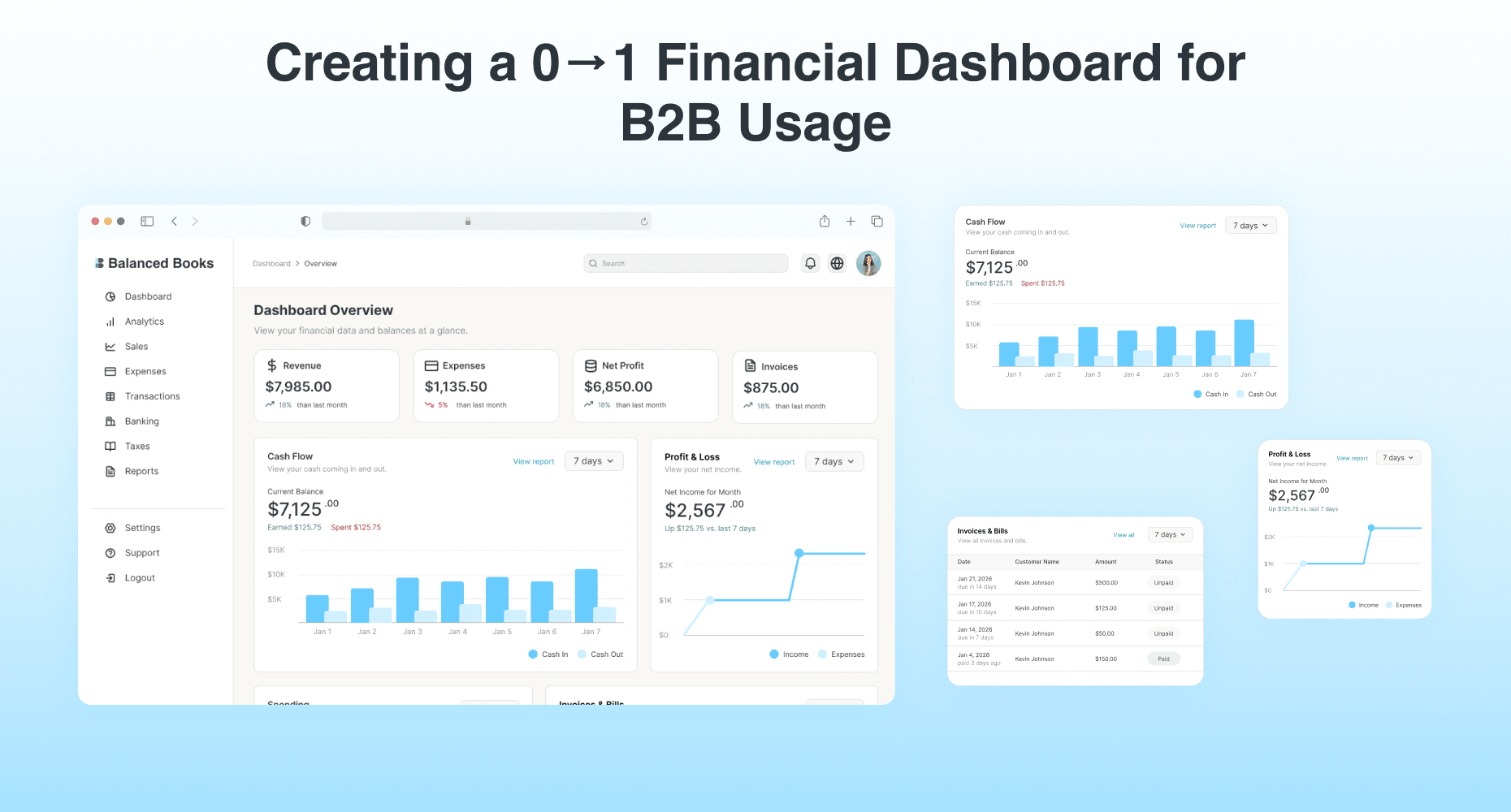
Creating a 0→1 Financial Dashboard for B2B Users by utilizing widgets with key financial metrics and an intuitive user interface. For this case study, I will be focusing only on the home dashboard.
Creating a 0→1 Financial Dashboard for B2B Users by utilizing widgets with key financial metrics and an intuitive user interface. For this case study, I will be focusing only on the home dashboard.
Role
Role
UX/UI Designer
UX/UI Designer
Tools
Tools
Figma
Figma
Team
Team
3 Front end developers
4 Back end developers
3 Front end developers
4 Back end developers
Scope
Scope
User Research
Information Architecture
Dashboard UI Design
Prototyping
User Research
Information Architecture
Dashboard UI Design
Prototyping
Timeline
Timeline
November 2025 - January 2026
November 2025 - January 2026
Role
UX/UI Designer
Tools
Figma
Team
3 Front end developers
4 Back end developers
Scope
User Research
Information Architecture
Dashboard UI Design
Prototyping
Timeline
November 2025 - January 2026
The primary challenges were identifying key financial metrics business users prefer. Both inexperienced and experienced users also need to be able to understand how to read the financial dashboard.
The primary challenges were identifying key financial metrics business users prefer. Both inexperienced and experienced users also need to be able to understand how to read the financial dashboard.
Discovering the Problems
Discovering the Problems
User Research
User Research
To better understand the users’ needs, I utilized user interviews, conducted a competitive analysis, and did white paper research to further support my design choices.
To better understand the users’ needs, I utilized user interviews, conducted a competitive analysis, and did white paper research to further support my design choices.
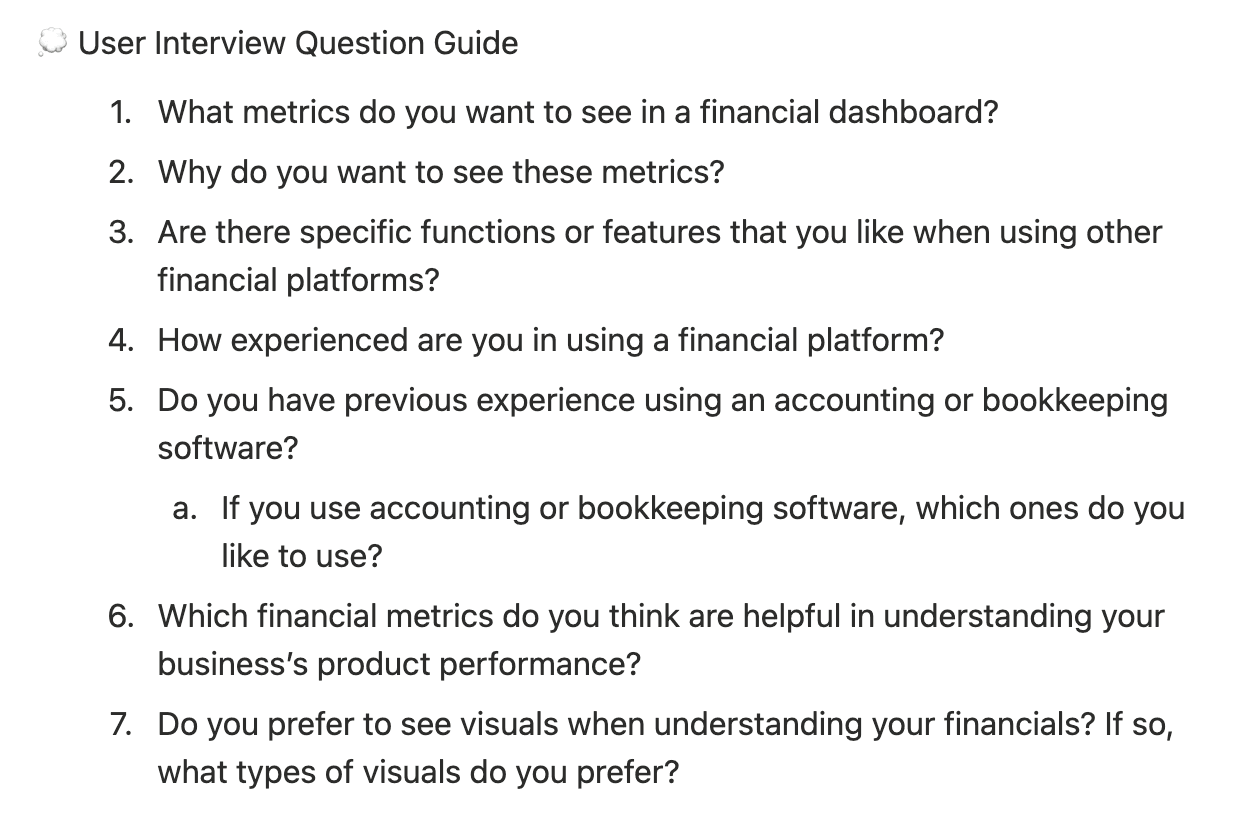
💬 User Interviews
💬 User Interviews
💬 User Interviews
💡 Key Insights
💡 Key Insights
💡 Key Insights
Methodology
Methodology
Methodology
Sample size
Sample size
Sample size
User Surveys
User Surveys
User Surveys
5 people
5 people
5 people
USER NEEDS
USER NEEDS
USER NEEDS
FRUSTRATIONS
FRUSTRATIONS
FRUSTRATIONS
SATISFACTIONS
SATISFACTIONS
SATISFACTIONS
Financial KPIs
Financial KPIs
Financial KPIs
CSV Export Button
CSV Export Button
CSV Export Button
Learning curves to use software
Learning curves to use software
Learning curves to use software
High costs/subscription plans
High costs/subscription plans
High costs/subscription plans
Improve accessibility options
Improve accessibility options
Improve accessibility options
Data visuals
Data visuals
Data visuals
Performance metrics
Performance metrics
Performance metrics
Adjust time frames
Adjust time frames
Adjust time frames
Invoice/transaction history
Invoice/transaction history
Invoice/transaction history
Although some business owners don’t use it since they sync their transactions to an accounting software, having a CSV export button is helpful for bookkeeping purposes and prefer having the option in case syncing somehow fails or there is a system outage.
Although some business owners don’t use it since they sync their transactions to an accounting software, having a CSV export button is helpful for bookkeeping purposes and prefer having the option in case syncing somehow fails or there is a system outage.
Quick visual assessments of financial performance were also important for users, specifically revenue, expenses, payouts, and their invoice/transaction history.
Quick visual assessments of financial performance were also important for users, specifically revenue, expenses, payouts, and their invoice/transaction history.
Users also need to be able to adjust the time frames so they require some method to change the transaction periods and prefer calendar type inputs for custom time frames.
Users also need to be able to adjust the time frames so they require some method to change the transaction periods and prefer calendar type inputs for custom time frames.
📊 Competitive Analysis
📊 Competitive Analysis
📊 Competitive Analysis
🏢 Companies:
🏢 Companies:
🏢 Companies:



📈 Key Trends:
Automation
Similar Color Schemes
AI Capabilities
Bar, pie, line charts
📈 Key Trends:
Automation
Similar Color Schemes
AI Capabilities
Bar, pie, line charts
📈 Key Trends:
Automation
Similar Color Schemes
AI Capabilities
Bar, pie, line charts
✅ Strengths:
Insightful data charts
Detailed reporting and expense tracking
Color psychology usage
✅ Strengths:
Insightful data charts
Detailed reporting and expense tracking
Color psychology usage
✅ Strengths:
Insightful data charts
Detailed reporting and expense tracking
Color psychology usage
❌ Weaknesses:
Learning curves for inexperienced users
High costs depending on business structure
❌ Weaknesses:
Learning curves for inexperienced users
High costs depending on business structure
❌ Weaknesses:
Learning curves for inexperienced users
High costs depending on business structure
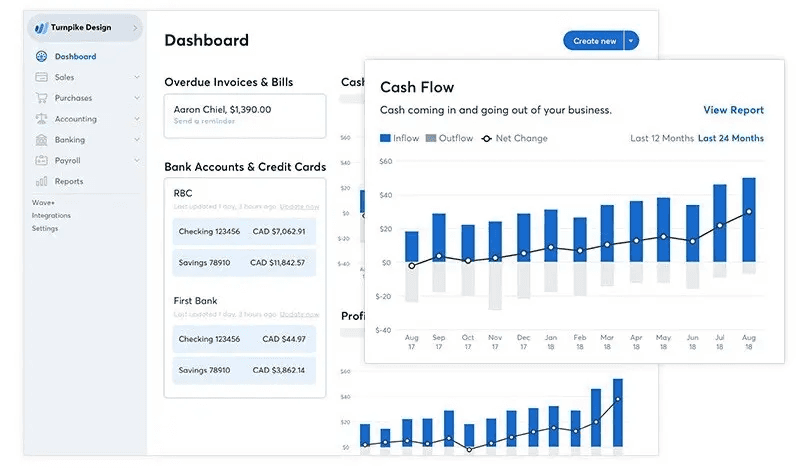
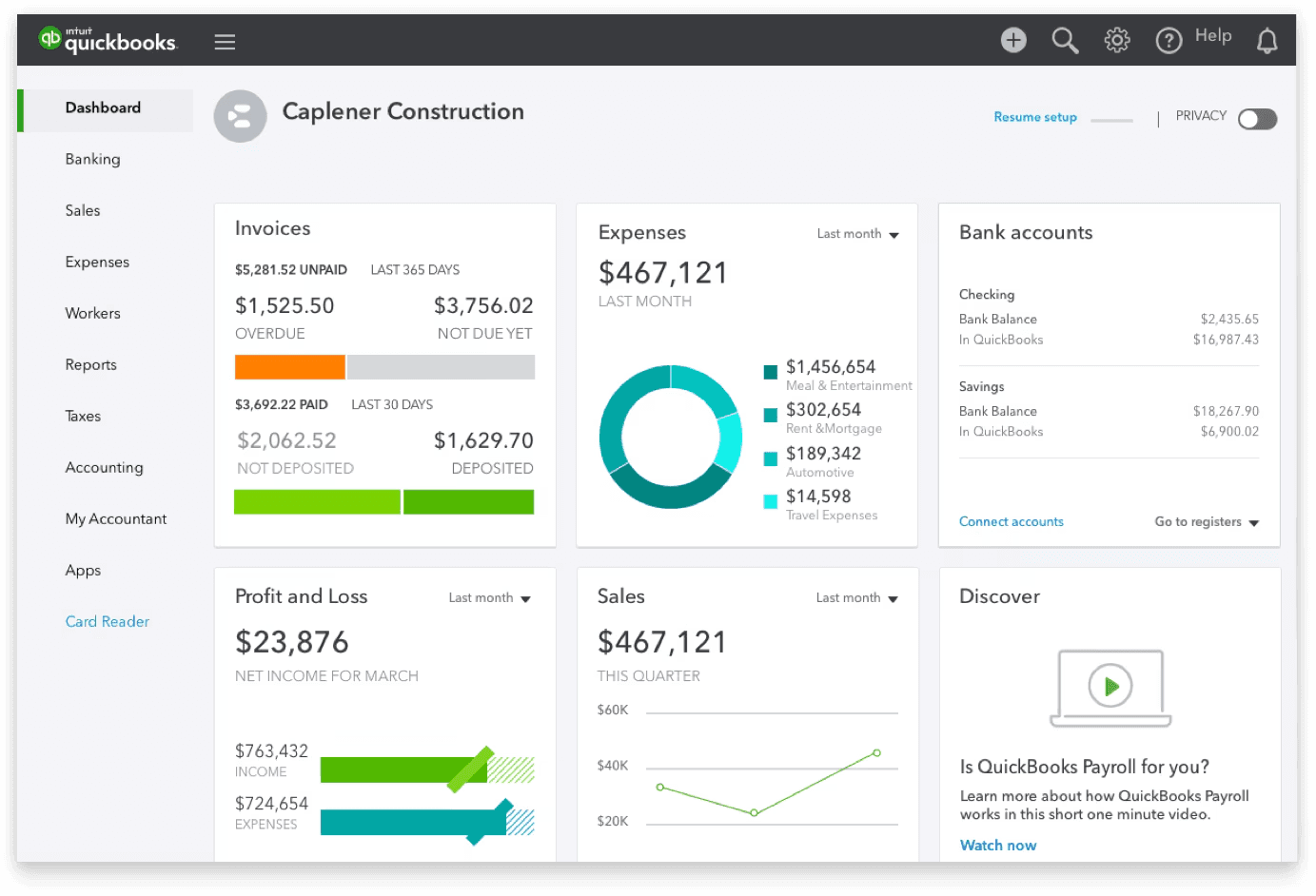
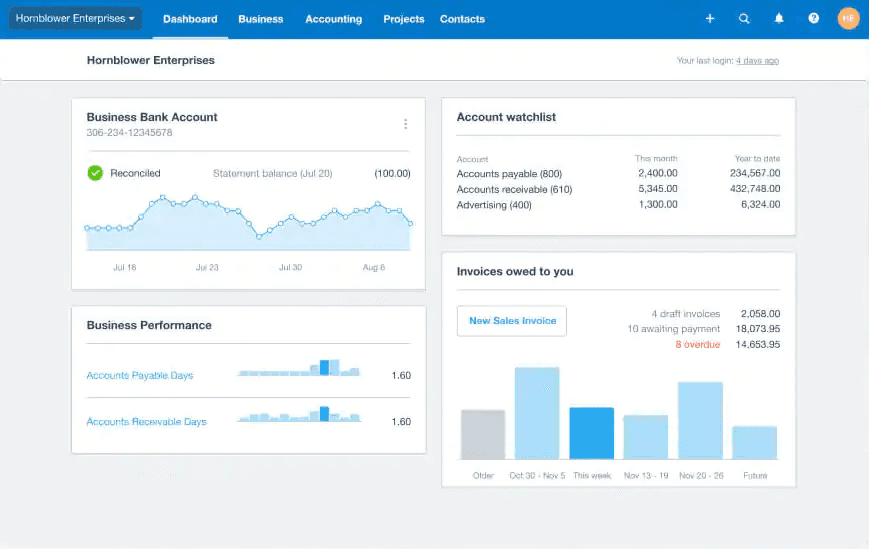
After reviewing other financial accounting software, I noticed similar trends between them. Based on these findings, I gained a better idea of what types of information widgets to include within the dashboard and how to visualize them. While I did notice there may be a slight learning curve for inexperienced users, I decided to at least ensure to use data visuals so it’s easier for users to digest their financial information. I also decided to include an accessibility function for users who may not use USD and include an option to switch to different currencies after comparing my user insights.
After reviewing other financial accounting software, I noticed similar trends between them. Based on these findings, I gained a better idea of what types of information widgets to include within the dashboard and how to visualize them. While I did notice there may be a slight learning curve for inexperienced users, I decided to at least ensure to use data visuals so it’s easier for users to digest their financial information. I also decided to include an accessibility function for users who may not use USD and include an option to switch to different currencies after comparing my user insights.
White Paper Research
White Paper Research
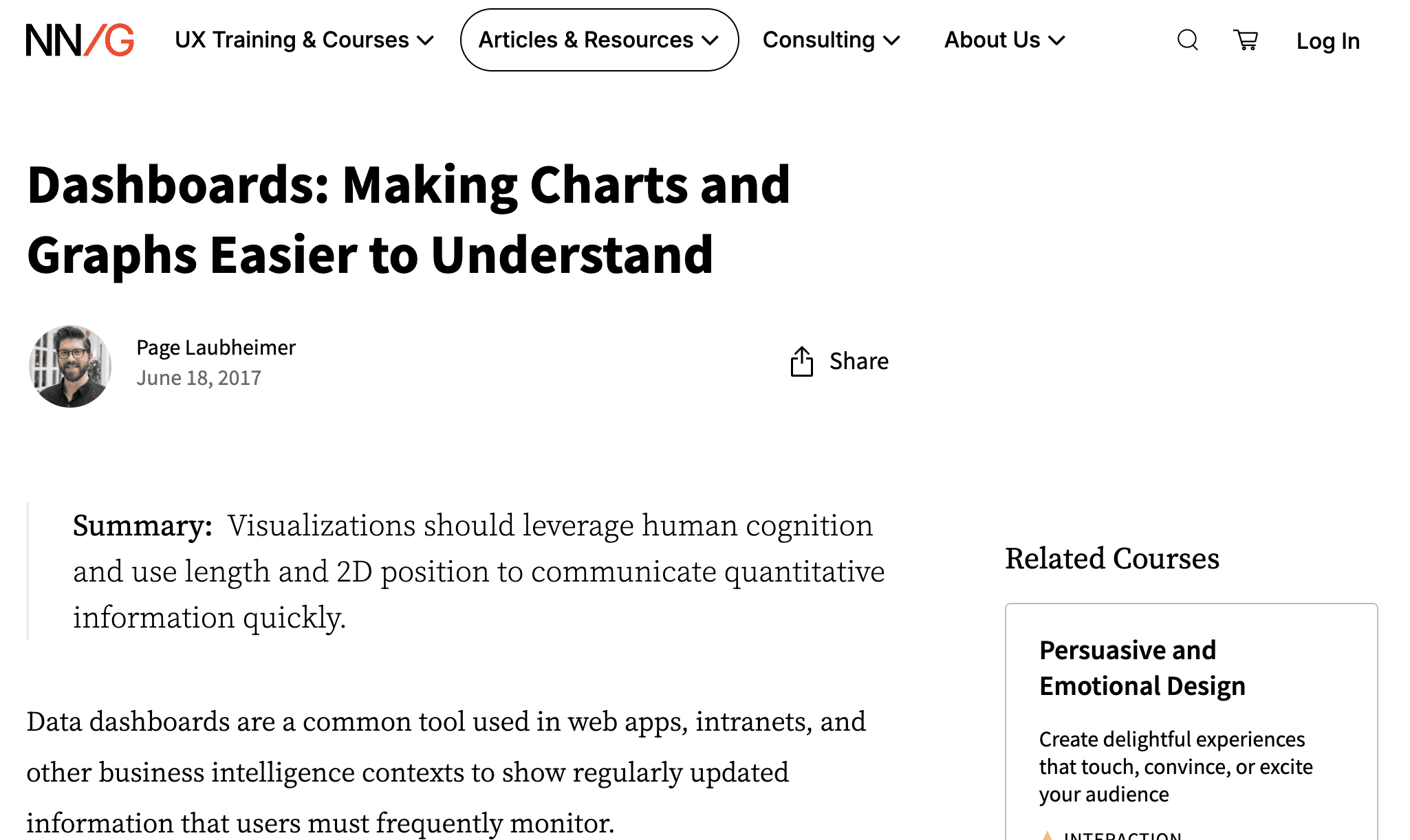
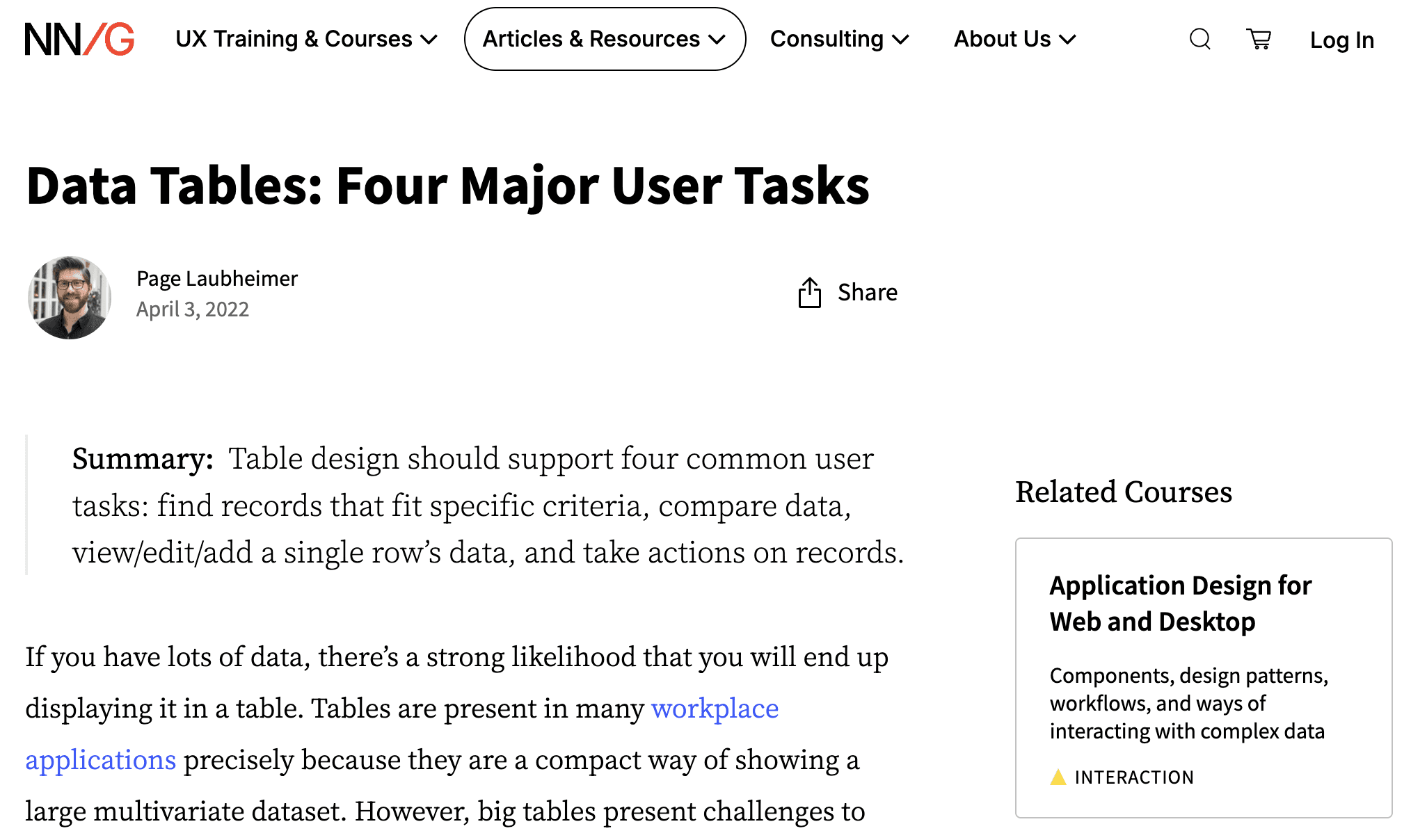
I had limited experience designing dashboards, so in order to support the design ideas I was considering, I conducted additional white paper research using the Nielson Norman Group site. I used these articles I found to understand how to better utilize different types of data charts and the best methods to convey specific financial metrics for users. From my research, I settled on using a bar chart, line, pie, and tables for some of the widgets to organize each visual’s information using the Gesalt psychology principle and utilizing semantic grouping. I also grouped together overview containers to showcase more common metrics users need.
I had limited experience designing dashboards, so in order to support the design ideas I was considering, I conducted additional white paper research using the Nielson Norman Group site. I used these articles I found to understand how to better utilize different types of data charts and the best methods to convey specific financial metrics for users. From my research, I settled on using a bar chart, line, pie, and tables for some of the widgets to organize each visual’s information using the Gesalt psychology principle and utilizing semantic grouping. I also grouped together overview containers to showcase more common metrics users need.
📖 White Paper Research
📖 White Paper Research
📖 White Paper Research
Sourced from: Nielson Norman Group. https://www.nngroup.com/
https://www.nngroup.com/articles/dashboards-preattentive/
https://www.nngroup.com/articles/data-tables/
Sourced from: Nielson Norman Group. https://www.nngroup.com/
https://www.nngroup.com/articles/dashboards-preattentive/
https://www.nngroup.com/articles/data-tables/
Sourced from: Nielson Norman Group. https://www.nngroup.com/
https://www.nngroup.com/articles/dashboards-preattentive/
https://www.nngroup.com/articles/data-tables/
Information Architecture
Information Architecture
After gathering all the information together, I began organizing what may be relevant within the different sections of the dashboard and created a diagram for my design reference:
After gathering all the information together, I began organizing what may be relevant within the different sections of the dashboard and created a diagram for my design reference:
After gathering all the information together, I began organizing what may be relevant within the different sections of the dashboard and created a diagram for my design reference:
Compiling all my research into a structured layout for the full dashboard
Compiling all my research into a structured layout for the full dashboard
Information Architecture
Information Architecture
Information Architecture
Dashboard Structure
Dashboard Structure
Dashboard Structure
Settings
Settings
Settings
Business Profile
Business Profile
Business Profile
Subscription & Billing
Subscription & Billing
Subscription & Billing
Account Management
Account Management
Account Management
Support
Support
Support
Contact
Contact
Contact
FAQ
FAQ
FAQ
Logout
Logout
Logout
Dashboard
Dashboard
Dashboard
Cash Flow
Cash Flow
Cash Flow
Product Performance
Product Performance
Product Performance
Expenses by category
Expenses by category
Expenses by category
Spend Analysis
Spend Analysis
Spend Analysis
Payroll & Benefits Summary
Payroll & Benefits Summary
Payroll & Benefits Summary
Revenue Analysis
Revenue Analysis
Revenue Analysis
Sales Growth
Sales Growth
Sales Growth
Performance Matrix
Performance Matrix
Performance Matrix
Sales by source
Sales by source
Sales by source
Inventory turnover
Inventory turnover
Inventory turnover
Spending Breakdown
Spending Breakdown
Spending Breakdown
Balance Sheet
Balance Sheet
Balance Sheet
Profit & Loss Statement
Profit & Loss Statement
Profit & Loss Statement
Cash Flow Statement
Cash Flow Statement
Cash Flow Statement
Accounts
Accounts
Accounts
Invoice History
Invoice History
Invoice History
Export CSV/PDF
Export CSV/PDF
Export CSV/PDF
Sales Tax
Sales Tax
Sales Tax
Tax Documents
Tax Documents
Tax Documents
Tax Summary
Tax Summary
Tax Summary
Reconciliation
Reconciliation
Reconciliation
Payouts
Payouts
Payouts
Profit & Loss
Profit & Loss
Profit & Loss
Spending
Spending
Spending
Invoice & Bills
Invoice & Bills
Invoice & Bills
Analytics
Analytics
Analytics
Sales
Sales
Sales
Expenses
Expenses
Expenses
Side Navigation Menu
Side Navigation Menu
Side Navigation Menu
Transactions
Transactions
Transactions
Banking
Banking
Banking
Taxes
Taxes
Taxes
Reports
Reports
Reports
MVP Opportunities
MVP Opportunities
Based on what I found from my user research and themes I saw in my market analysis, I came up with dashboard features that were catered towards what business users may need:
Based on what I found from my user research and themes I saw in my market analysis, I came up with dashboard features that were catered towards what business users may need:
Based on what I found from my user research and themes I saw in my market analysis, I came up with dashboard features that were catered towards what business users may need:
I identified four main features for the MVP
I identified four main features for the MVP
📁 KPI Widgets
📁 KPI Widgets
Breaks down and organizes key financial metrics
Breaks down and organizes key financial metrics
💰 Financial Reporting
💰 Financial Reporting
Business reports that contain in-depth insights about performance
Business reports that contain in-depth insights about performance
🔍 Visual Clarity
🔍 Visual Clarity
Intuitive layout to understand metrics at a glance
Intuitive layout to understand metrics at a glance
🌐 Accessibility
🌐 Accessibility
Different language/currency options for global users
Different language/currency options for global users
Dashboard Concept
Dashboard Concept
Like common trends with dashboards, I explored a few different layouts and data charts to include in the dashboard until landing on these lo-fi iteration. For the hi-fi wireframes, I did add in a profit and loss line chart since I felt it was missing from the lo-fi dashboard overview when I revisited the design. I also wanted to include data containers of common metrics at the top so users can quickly view these KPIs along with the data chart widgets.
Like common trends with dashboards, I explored a few different layouts and data charts to include in the dashboard until landing on these lo-fi iteration. For the hi-fi wireframes, I did add in a profit and loss line chart since I felt it was missing from the lo-fi dashboard overview when I revisited the design. I also wanted to include data containers of common metrics at the top so users can quickly view these KPIs along with the data chart widgets.
Like common trends with dashboards, I explored a few different layouts and data charts to include in the dashboard until landing on these lo-fi iteration. For the hi-fi wireframes, I did add in a profit and loss line chart since I felt it was missing from the lo-fi dashboard overview when I revisited the design. I also wanted to include data containers of common metrics at the top so users can quickly view these KPIs along with the data chart widgets.
Once I outlined my features, I started conceptualizing with lo-fi wireframes
Once I outlined my features, I started conceptualizing with lo-fi wireframes
✏️ Lo-Fi Wireframe
✏️ Lo-Fi Wireframe
✏️ Lo-Fi Wireframe
Balanced Books
Balanced Books
Balanced Books
Dashboard
Dashboard
Dashboard
Banking
Banking
Banking
Analytics
Analytics
Analytics
Reports
Reports
Reports
Taxes
Taxes
Taxes
Transactions
Transactions
Transactions
Sales
Sales
Sales
Expenses
Expenses
Expenses
Settings
Settings
Settings
Support
Support
Support
Logout
Logout
Logout
Dashboard Overview
Dashboard Overview
Dashboard Overview
View your financial data and balances at a glance.
View your financial data and balances at a glance.
View your financial data and balances at a glance.
View your financial data and balances at a glance.
View your financial data and balances at a glance.
View your financial data and balances at a glance.
$0.00
$0.00
$0.00
than last month
than last month
than last month
10%
10%
10%
$0.00
$0.00
$0.00
than last month
than last month
than last month
10%
10%
10%
$0.00
$0.00
$0.00
than last month
than last month
than last month
10%
10%
10%
Dashboard > Overview
Dashboard > Overview
Dashboard > Overview
Revenue
Revenue
Revenue
$0.00
$0.00
$0.00
than last month
than last month
than last month
10%
10%
10%
Expenses
Expenses
Expenses
Net Profit
Net Profit
Net Profit
Invoices
Invoices
Invoices
Cash Flow
Cash Flow
Cash Flow
View your cash coming in and out.
View your cash coming in and out.
View your cash coming in and out.
Jan 1
Jan 1
Jan 1
Jan 2
Jan 2
Jan 2
Jan 3
Jan 3
Jan 3
Jan 4
Jan 4
Jan 4
Jan 5
Jan 5
Jan 5
Jan 6
Jan 6
Jan 6
Jan 7
Jan 7
Jan 7
7 days
7 days
7 days
Recent Invoices
Recent Invoices
Recent Invoices
Due Date
Due Date
Due Date
Customer Name
Customer Name
Customer Name
Invoice ID
Invoice ID
Invoice ID
Amount
Amount
Amount
Category
Category
Category
Status
Status
Status
View your spending by category.
View your spending by category.
View your spending by category.
Personnel costs
Personnel costs
Personnel costs
Rent
Rent
Rent
Shipping supplies
Shipping supplies
Shipping supplies
Utilities
Utilities
Utilities
Marketing
Marketing
Marketing
7 days
7 days
7 days
Spending
Spending
Spending
$2,567
$2,567
$2,567
Total
Total
Total
Export
Export
Export
All
All
All
Status
Status
Status
01/31/2026
01/31/2026
01/31/2026
John Doe
John Doe
John Doe
INV-1
INV-1
INV-1
$00.00
$00.00
$00.00
Expense
Expense
Expense
Completed
Completed
Completed
01/31/2026
01/31/2026
01/31/2026
John Doe
John Doe
John Doe
INV-1
INV-1
INV-1
$00.00
$00.00
$00.00
Expense
Expense
Expense
Completed
Completed
Completed
01/31/2026
01/31/2026
01/31/2026
John Doe
John Doe
John Doe
INV-1
INV-1
INV-1
$00.00
$00.00
$00.00
Expense
Expense
Expense
Completed
Completed
Completed
01/31/2026
01/31/2026
01/31/2026
John Doe
John Doe
John Doe
INV-1
INV-1
INV-1
$00.00
$00.00
$00.00
Expense
Expense
Expense
Completed
Completed
Completed
$10
$10
$10
$20
$20
$20
$30
$30
$30
Search
Search
Search
Settling on Dashboard Features
Settling on Dashboard Features
To ensure it was easy for users to keep track of different financial categories and data, I created widgets so the data will be easier for users to digest by using visuals. These widgets utilized different data charts and financial breakdowns based on their category with buttons that navigate to more in-depth financial reports.
To ensure it was easy for users to keep track of different financial categories and data, I created widgets so the data will be easier for users to digest by using visuals. These widgets utilized different data charts and financial breakdowns based on their category with buttons that navigate to more in-depth financial reports.
To ensure it was easy for users to keep track of different financial categories and data, I created widgets so the data will be easier for users to digest by using visuals. These widgets utilized different data charts and financial breakdowns based on their category with buttons that navigate to more in-depth financial reports.
After putting together the required functions, I began iterating the hi-fi wireframes
After putting together the required functions, I began iterating the hi-fi wireframes
Widgets
Widgets
Widgets
Earned: $500.00
Spent: $125.00
Earned: $500.00
Spent: $125.00
Earned: $500.00
Spent: $125.00
Earned: $500.00
Spent: $125.00
Earned: $500.00
Spent: $125.00
Earned: $500.00
Spent: $125.00
Earned: $500.00
Spent: $125.00
Earned: $500.00
Spent: $125.00
Earned: $500.00
Spent: $125.00
Earned: $500.00
Spent: $125.00
Earned: $500.00
Spent: $125.00
Earned: $500.00
Spent: $125.00
Earned: $500.00
Spent: $125.00
Earned: $500.00
Spent: $125.00
Earned: $500.00
Spent: $125.00
Earned: $500.00
Spent: $125.00
Earned: $500.00
Spent: $125.00
Earned: $500.00
Spent: $125.00
Earned: $500.00
Spent: $125.00
Earned: $500.00
Spent: $125.00
Earned: $500.00
Spent: $125.00
View report
View report
View report
Cash Flow
Cash Flow
Cash Flow
View your cash coming in and out.
View your cash coming in and out.
View your cash coming in and out.
Jan 1
Jan 1
Jan 1
Jan 2
Jan 2
Jan 2
Jan 3
Jan 3
Jan 3
Jan 4
Jan 4
Jan 4
Jan 5
Jan 5
Jan 5
Jan 6
Jan 6
Jan 6
Jan 7
Jan 7
Jan 7
$10K
$10K
$10K
$5K
$5K
$5K
$15K
$15K
$15K
Cash In
Cash In
Cash In
Cash Out
Cash Out
Cash Out
Current Balance
Current Balance
Current Balance
Earned $125.75
Earned $125.75
Earned $125.75
Spent $125.75
Spent $125.75
Spent $125.75
$7,125
$7,125
$7,125
.00
.00
.00
Profit & Loss
Profit & Loss
Profit & Loss
View your net income.
View your net income.
View your net income.
$2,567
$2,567
$2,567
Up $125.75 vs. last 7 days
Up $125.75 vs. last 7 days
Up $125.75 vs. last 7 days
Net Income for Month
Net Income for Month
Net Income for Month
.00
.00
.00
Income
Income
Income
Expenses
Expenses
Expenses
$1K
$1K
$1K
$0
$0
$0
$2K
$2K
$2K
View report
View report
View report
7 days
7 days
7 days
Breakeven $1,000.00
Breakeven $1,000.00
Breakeven $1,000.00
Profit
$2,567.00
Profit
$2,567.00
Profit
$2,567.00
Invoices & Bills
Invoices & Bills
Invoices & Bills
View all invoices and bills.
View all invoices and bills.
View all invoices and bills.
Date
Date
Date
Customer Name
Customer Name
Customer Name
Amount
Amount
Amount
Status
Status
Status
View all
View all
View all
Unpaid
Unpaid
Unpaid
Jan 21, 2026
Jan 21, 2026
Jan 21, 2026
due in 14 days
due in 14 days
due in 14 days
Kevin Johnson
Kevin Johnson
Kevin Johnson
$500.00
$500.00
$500.00
Unpaid
Unpaid
Unpaid
Jan 17, 2026
Jan 17, 2026
Jan 17, 2026
due in 10 days
due in 10 days
due in 10 days
Kevin Johnson
Kevin Johnson
Kevin Johnson
$125.00
$125.00
$125.00
Unpaid
Unpaid
Unpaid
Jan 14, 2026
Jan 14, 2026
Jan 14, 2026
due in 7 days
due in 7 days
due in 7 days
Kevin Johnson
Kevin Johnson
Kevin Johnson
$50.00
$50.00
$50.00
Paid
Paid
Paid
Jan 4, 2026
Jan 4, 2026
Jan 4, 2026
paid 3 days ago
paid 3 days ago
paid 3 days ago
Kevin Johnson
Kevin Johnson
Kevin Johnson
$150.00
$150.00
$150.00
7 days
7 days
7 days
View your spending by category.
View your spending by category.
View your spending by category.
7 days
7 days
7 days
Spending
Spending
Spending
$1,135
$1,135
$1,135
.00
.00
.00
Saved $125.75 vs. last 7 days
Saved $125.75 vs. last 7 days
Saved $125.75 vs. last 7 days
Total Expenses
Total Expenses
Total Expenses
Payroll
Payroll
Payroll
Rent & Utilities
Rent & Utilities
Rent & Utilities
Advertising & Marketing
Advertising & Marketing
Advertising & Marketing
Software
Software
Software
Professional Services
Professional Services
Professional Services
View report
View report
View report
7 days
7 days
7 days
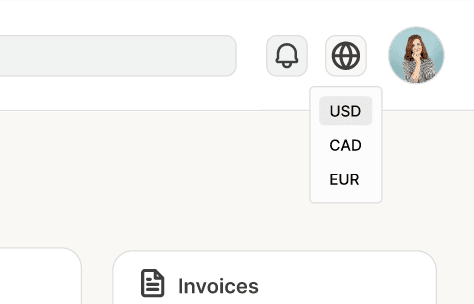
To offer more accessibility, I added in a language/currency switch button so users can view the financial data in their preferred language. While we’re not able to do all languages, they will potentially be added in later once international markets are confirmed by stakeholders.
To offer more accessibility, I added in a language/currency switch button so users can view the financial data in their preferred language. While we’re not able to do all languages, they will potentially be added in later once international markets are confirmed by stakeholders.
To offer more accessibility, I added in a language/currency switch button so users can view the financial data in their preferred language. While we’re not able to do all languages, they will potentially be added in later once international markets are confirmed by stakeholders.
There needed to be usability for adjusting the time frames, so I included a time filter to change the data charts. This would allow users to understand the specifics of their financials if they were not viewing the dashboard during a certain time and needed to view something on a specific date. When laying out the functions for the designs, the time filter originally included a custom calendar date selector so users can be as specific as possible, but it was left out since it was uncertain if it could be developed in time for launch. It will be included post-launch due to time constraints.
There needed to be usability for adjusting the time frames, so I included a time filter to change the data charts. This would allow users to understand the specifics of their financials if they were not viewing the dashboard during a certain time and needed to view something on a specific date. When laying out the functions for the designs, the time filter originally included a custom calendar date selector so users can be as specific as possible, but it was left out since it was uncertain if it could be developed in time for launch. It will be included post-launch due to time constraints.
There needed to be usability for adjusting the time frames, so I included a time filter to change the data charts. This would allow users to understand the specifics of their financials if they were not viewing the dashboard during a certain time and needed to view something on a specific date. When laying out the functions for the designs, the time filter originally included a custom calendar date selector so users can be as specific as possible, but it was left out since it was uncertain if it could be developed in time for launch. It will be included post-launch due to time constraints.
Accessibility Options
Accessibility Options
Accessibility Options & Filter Button
Accessibility Options & Filter Button
Accessibility Options & Filter Button
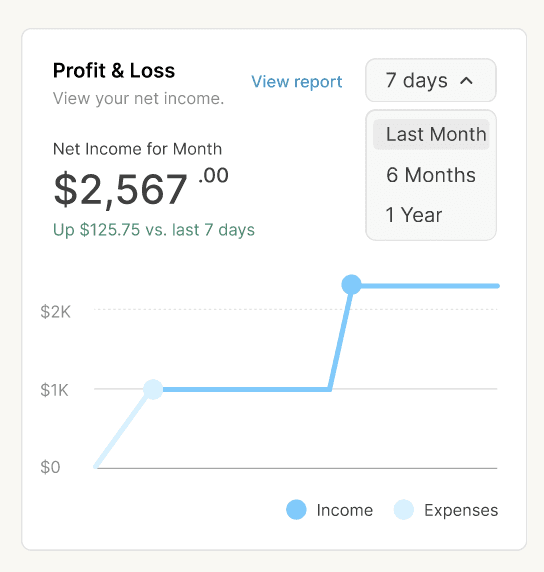
I decided to reduce the amount of colors for the data charts to make it easier to visually assess the metrics. I primarily used blue as the main color since it helps signify data reliability and calmness especially when the data may have alarming results from downward trends. The darkest shades were used to signify important values with the lightest shades present lower value data points. I made sure to limit the typography font sizes so it’s not overwhelming and designed the components layouts to be similar so users can easily recognize the specific charts.
I decided to reduce the amount of colors for the data charts to make it easier to visually assess the metrics. I primarily used blue as the main color since it helps signify data reliability and calmness especially when the data may have alarming results from downward trends. The darkest shades were used to signify important values with the lightest shades present lower value data points. I made sure to limit the typography font sizes so it’s not overwhelming and designed the components layouts to be similar so users can easily recognize the specific charts.
I decided to reduce the amount of colors for the data charts to make it easier to visually assess the metrics. I primarily used blue as the main color since it helps signify data reliability and calmness especially when the data may have alarming results from downward trends. The darkest shades were used to signify important values with the lightest shades present lower value data points. I made sure to limit the typography font sizes so it’s not overwhelming and designed the components layouts to be similar so users can easily recognize the specific charts.
Visual Design
Visual Design
🎨 Design System
🎨 Design System
🎨 Design System
HEX
HEX
HEX
D1F0FF
D1F0FF
D1F0FF
Bar Color 1
Bar Color 1
Bar Color 1
HEX
HEX
HEX
D1F0FF
D1F0FF
D1F0FF
Bar Color 1
Bar Color 1
Bar Color 1
HEX
HEX
HEX
DEDEDE
DEDEDE
DEDEDE
Lines, Borders
Lines, Borders
Lines, Borders
HEX
HEX
HEX
8F8F8F
8F8F8F
8F8F8F
Gray Text
Gray Text
Gray Text
HEX
HEX
HEX
F2F2F2
F2F2F2
F2F2F2
Gray Containers
Gray Containers
Gray Containers
HEX
HEX
HEX
ADADAD
ADADAD
ADADAD
Dark Chart Line
Dark Chart Line
Dark Chart Line
HEX
HEX
HEX
D1F0FF
D1F0FF
D1F0FF
Default Text
Default Text
Default Text
HEX
HEX
HEX
D1F0FF
D1F0FF
D1F0FF
Default Text
Default Text
Default Text
HEX
HEX
HEX
D1F0FF
D1F0FF
D1F0FF
Upwards Trend
Upwards Trend
Upwards Trend
HEX
HEX
HEX
D1F0FF
D1F0FF
D1F0FF
Down Trend
Down Trend
Down Trend
HEX
HEX
HEX
3292C2
3292C2
3292C2
Text Button 1
Text Button 1
Text Button 1
HEX
HEX
HEX
D1F0FF
D1F0FF
D1F0FF
Button Default 1
Button Default 1
Button Default 1
HEX
HEX
HEX
00699D
00699D
00699D
Button Text 2
Button Text 2
Button Text 2
HEX
HEX
HEX
E8FFE1
E8FFE1
E8FFE1
Status Default 1
Status Default 1
Status Default 1
HEX
HEX
HEX
3C8D3B
3C8D3B
3C8D3B
Status Text 1
Status Text 1
Status Text 1
HEX
HEX
HEX
F8F8F8
F8F8F8
F8F8F8
Status Default 2
Status Default 2
Status Default 2
HEX
HEX
HEX
67CCFF
67CCFF
67CCFF
Bar Color 2
Bar Color 2
Bar Color 2
HEX
HEX
HEX
12A8F2
12A8F2
12A8F2
Bar Color 3
Bar Color 3
Bar Color 3
HEX
HEX
HEX
95DCFF
95DCFF
95DCFF
Bar Color 4
Bar Color 4
Bar Color 4
HEX
HEX
HEX
5AC8FF
5AC8FF
5AC8FF
Bar Color 5
Bar Color 5
Bar Color 5
HEX
HEX
HEX
2DAAE8
2DAAE8
2DAAE8
Bar Color 6
Bar Color 6
Bar Color 6
HEX
HEX
HEX
1C8BC2
1C8BC2
1C8BC2
Bar Color 7
Bar Color 7
Bar Color 7
Color Palette
Color Palette
Color Palette
Typography
Typography
Typography
Components
Components
Components
Iconography
Iconography
Iconography
Data Chart Style 1
Data Chart Style 1
Data Chart Style 1
Data Chart and Containers
Data Chart and Containers
Data Chart and Containers
Text
Text
Text
Data Chart Style 2
Data Chart Style 2
Data Chart Style 2
Button States
Button States
Button States
View report
View report
View report
View report
View report
View report
7 days
7 days
7 days
7 days
7 days
7 days
Last Month
Last Month
Last Month
6 Months
6 Months
6 Months
1 Year
1 Year
1 Year
Unpaid
Unpaid
Unpaid
Jan 15, 2026
Jan 15, 2026
Jan 15, 2026
due in 14 days
due in 14 days
due in 14 days
Kevin Johnson
Kevin Johnson
Kevin Johnson
$500.00
$500.00
$500.00
Jan 15, 2026
Jan 15, 2026
Jan 15, 2026
due in 14 days
due in 14 days
due in 14 days
Kevin Johnson
Kevin Johnson
Kevin Johnson
$500.00
$500.00
$500.00
Unpaid
Unpaid
Unpaid
Search
Search
Search
Search
Search
Search
|
|
|
|
|
|
Revenue
Revenue
Revenue
$7,985.00
$7,985.00
$7,985.00
than last month
than last month
than last month
18%
18%
18%
Revenue
Revenue
Revenue
$7,985.00
$7,985.00
$7,985.00
than last month
than last month
than last month
18%
18%
18%
Earned: $500.00
Spent: $125.00
Earned: $500.00
Spent: $125.00
Earned: $500.00
Spent: $125.00
Earned: $500.00
Spent: $125.00
Earned: $500.00
Spent: $125.00
Earned: $500.00
Spent: $125.00
Paid
Paid
Paid
Unpaid
Unpaid
Unpaid
Breakeven $1,000.00
Breakeven $1,000.00
Breakeven $1,000.00
Breakeven $1,000.00
Breakeven $1,000.00
Breakeven $1,000.00
Breakeven $1,000.00
Breakeven $1,000.00
Breakeven $1,000.00
View your spending by category.
View your spending by category.
View your spending by category.
7 days
7 days
7 days
Spending
Spending
Spending
$2,567
$2,567
$2,567
.00
.00
.00
Saved $125.75 vs. last 7 days
Saved $125.75 vs. last 7 days
Saved $125.75 vs. last 7 days
Total Expenses
Total Expenses
Total Expenses
Payroll
Payroll
Payroll
Rent & Utilities
Rent & Utilities
Rent & Utilities
Advertising & Marketing
Advertising & Marketing
Advertising & Marketing
Software
Software
Software
Professional Services
Professional Services
Professional Services
View report
View report
View report
View your spending by category.
View your spending by category.
View your spending by category.
7 days
7 days
7 days
Spending
Spending
Spending
$2,567
$2,567
$2,567
.00
.00
.00
Saved $125.75 vs. last 7 days
Saved $125.75 vs. last 7 days
Saved $125.75 vs. last 7 days
Total Expenses
Total Expenses
Total Expenses
Payroll
Payroll
Payroll
Rent & Utilities
Rent & Utilities
Rent & Utilities
Advertising & Marketing
Advertising & Marketing
Advertising & Marketing
Software
Software
Software
Professional Services
Professional Services
Professional Services
View report
View report
View report
Heading 2
Heading 2
Heading 2
Heading 1
Heading 1
Heading 1
Heading 2
Heading 2
Heading 2
24 px
24 px
24 px
32 px
32 px
32 px
24 px
24 px
24 px
Bold
Bold
Bold
Semi bold
Semi bold
Semi bold
Semi Bold
Semi Bold
Semi Bold
Primary page headers
Primary page headers
Primary page headers
Numerical values
Numerical values
Numerical values
Chart titles, numerical values
Chart titles, numerical values
Chart titles, numerical values
Subheading
Subheading
Subheading
16 px
16 px
16 px
Semi Bold
Semi Bold
Semi Bold
Section titles
Section titles
Section titles
Regular Text
Regular Text
Regular Text
Small Text
Small Text
Small Text
16 px
16 px
16 px
13 px
13 px
13 px
Regular
Regular
Regular
Regular
Regular
Regular
Menu, paragraphs, search
Menu, paragraphs, search
Menu, paragraphs, search
Captions
Captions
Captions
Style
Style
Style
Font: Inter
Font: Inter
Font: Inter
Size
Size
Size
Weight
Weight
Weight
Usage
Usage
Usage
Dashboard
Dashboard
Dashboard
Dashboard
Dashboard
Dashboard
USD
USD
USD
CAD
CAD
CAD
EUR
EUR
EUR
USD
USD
USD
CAD
CAD
CAD
EUR
EUR
EUR
Prototype
Usability Testing
Usability Testing
For the language switch button, there was an issue the developers encountered during implementation and testing where the language would change, but then the corresponding currency would not change. It was unclear how quickly the issue could be resolved so it may not be implemented during launch, but potentially for post-launch if can be fixed.
For the language switch button, there was an issue the developers encountered during implementation and testing where the language would change, but then the corresponding currency would not change. It was unclear how quickly the issue could be resolved so it may not be implemented during launch, but potentially for post-launch if can be fixed.
Outcomes
Outcomes
While I was pressed for time, there were still many things I wanted to include as I was designing the full scale dashboard
While I was pressed for time, there were still many things I wanted to include as I was designing the full scale dashboard
Takeaways
Takeaways
The primary challenge for this design was identifying key metrics business users need to have within a financial dashboard and creating a simple UI to understand these metrics if they are not as experienced users.
The primary challenge for this design was identifying key metrics business users need to have within a financial dashboard and creating a simple UI to understand these metrics if they are not as experienced users.
What’s next for developing the financial dashboard?
What’s next for developing the financial dashboard?
Due to a tight launch deadline, there were many features that I wanted to include for a better user experience, but was unable to. In the future, I’d like to adjust the currency/language button so it’s more clear that the language is also changed instead of only labeling the currency. I would also like to have designed an improved time filter button with the calendar selector option to select more specific time frames since users may have issues if they can’t view only a single day or a specific times that are not included for the three default options. Although not featured in this case study, the different pages of the dashboard I feel I could have created more detailed financial reporting if I did not have a tight deadline and more time to conduct research.
Due to a tight launch deadline, there were many features that I wanted to include for a better user experience, but was unable to. In the future, I’d like to adjust the currency/language button so it’s more clear that the language is also changed instead of only labeling the currency. I would also like to have designed an improved time filter button with the calendar selector option to select more specific time frames since users may have issues if they can’t view only a single day or a specific times that are not included for the three default options. Although not featured in this case study, the different pages of the dashboard I feel I could have created more detailed financial reporting if I did not have a tight deadline and more time to conduct research.
Due to a tight launch deadline, there were many features that I wanted to include for a better user experience, but was unable to. In the future, I’d like to adjust the currency/language button so it’s more clear that the language is also changed instead of only labeling the currency. I would also like to have designed an improved time filter button with the calendar selector option to select more specific time frames since users may have issues if they can’t view only a single day or a specific times that are not included for the three default options. Although not featured in this case study, the different pages of the dashboard I feel I could have created more detailed financial reporting if I did not have a tight deadline and more time to conduct research.
Thank you for reading my case study!
Thank you for reading my case study!
Next up:
Next up: